
The following table lists and describes the most common Trend Line Types used in GEOExplorerIQ.
| Trend Type | Description | Calculation Example |
|---|---|---|
| Simple Average | The simple average is the mean of the previous N data. Here, N represents the period you have to choose. | 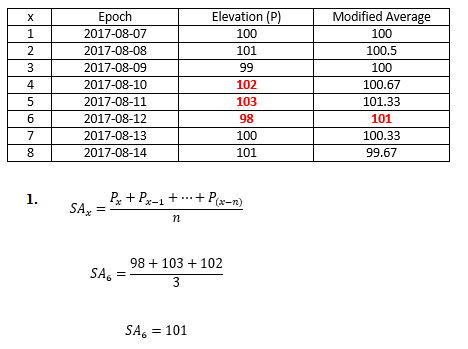 |
| Exponential Average | The exponential average is similar to the simple average, but it is weighted. The period you choose is used to calculate a coefficient. This coefficient defines the weight for each datum and it decreases exponentially. | 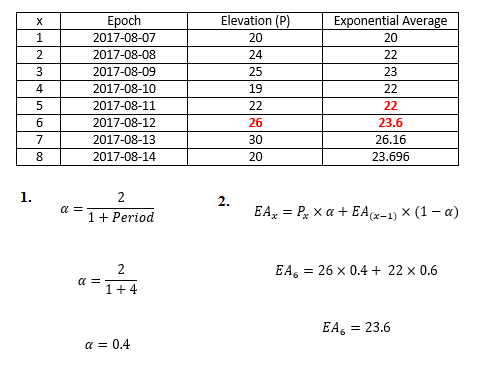 |
| Modified Average | The modified average is a derivate of the exponential average. The difference is the coefficient value. | 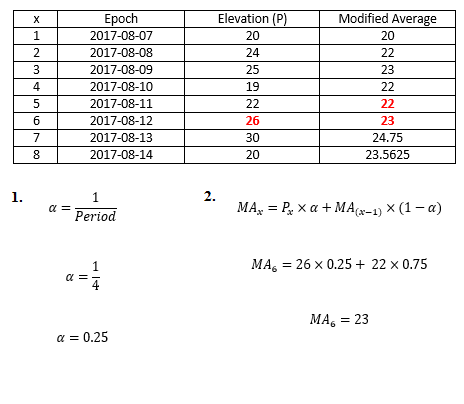 |
| Cumulative Average | The cumulative average is the mean of all previous data of a point. You don't have to choose a period for this type of trend line. | 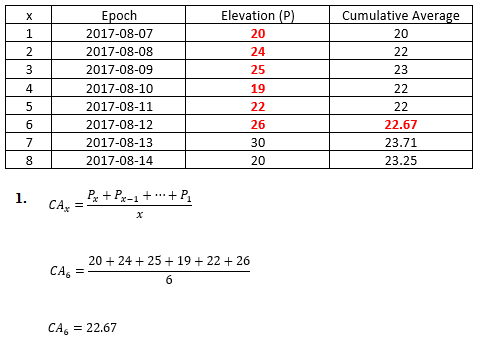 |
| Weighted Average | The Weighted Average is another variation of the simple average. The weight of data decreases linearly. The period you have to choose is the number of points use for each calculation. | 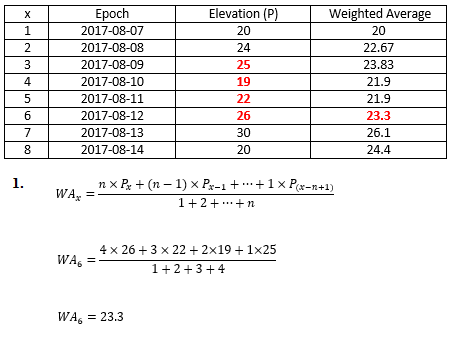 |
| Linear Average | Linear Average will produce the linear trend of the data on display. This will always be a straight line given the average has two points A & B. | 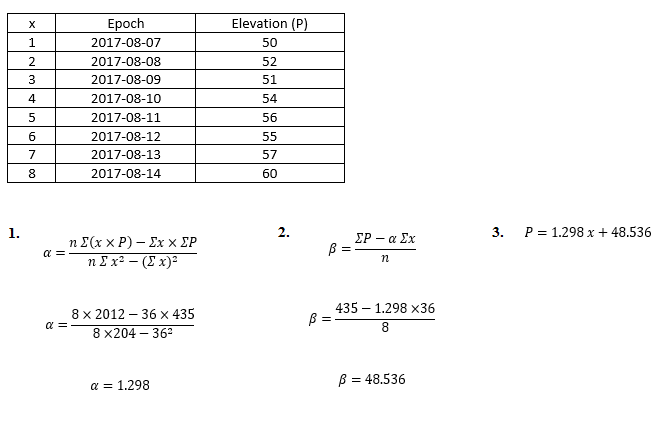 |