
Displacement & Velocity Calculations Used In GEOExplorerIQ
Overview
Several of the monitoring systems which GEOExplorerIQ supports generate displacement measurements at discrete intervals. GEOExplorerIQ stores these raw measurements, but also processes them to provide average displacement and velocity values. User-defined reports can then be generated to plot these data types on charts. Thresholds can be set to trigger real-time alarms based on their values.
Purpose of this Document
The purpose of this page is to explain how GEOExplorerIQ calculates average displacement values and velocity values from raw measurements. The examples provided here use data from prism and GNSS observations, but the explanation applies equally to other systems, such as extensometers and laser scanners.
Displacement and Velocity Calculations
General
Some monitoring hardware measures displacement directly. In contrast, for GEOExplorerIQ to be able to generate a displacement value, at least two measurements are required. The displacement is then calculated as a difference between two measured distances, or as the straight-line distance between two measured points. For example, a prism that is part of a calibrated total station monitoring installation is capable of generating both types of displacement: the Slope Distance Displacement is the difference in the measured distance to the prism, and 3D Displacement is the actual distance that the point has moved.
All displacement values are relative distances, and therefore they require a reference measurement. Initially, the reference is the first measurement taken when the system is installed, but it is possible for the user to alter this. Similarly, any subsequent measurement can also be selected as a reference. Displacement values from that point onwards will be reset so that they are calculated by comparing later measurements against this new reference. Ultimately, the data set for any sensor may contain several reset points.
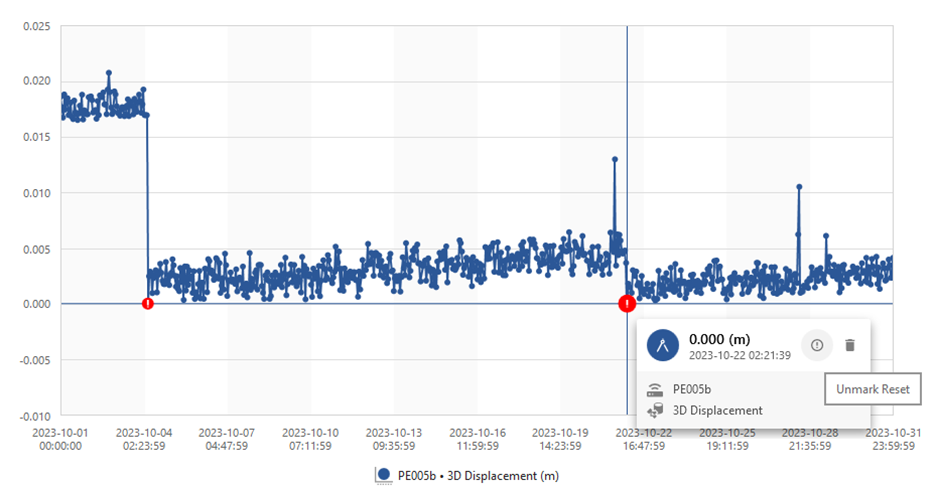
Figure 1 - Time series of prism displacement values with two reset points
Velocity
The rate of movement is calculated as the change of displacement between data over a certain time period or a certain number of measurements. It is usually expressed as either millimeters per day or inches per day.
GEOExplorerIQ calculates velocity values by fitting a linear trend to the data using the least squares method. The velocity is the slope of the straight line that best fits the selected pairs of displacement and time values. Using this method to compute the velocity rather than, say, simply dividing the difference between two displacement values by their time interval, enables the effect of outliers and ‘noisy’ data to be reduced and results in a more meaningful set of values when analyzing the data or setting alarm thresholds.
Example Velocity Calculation
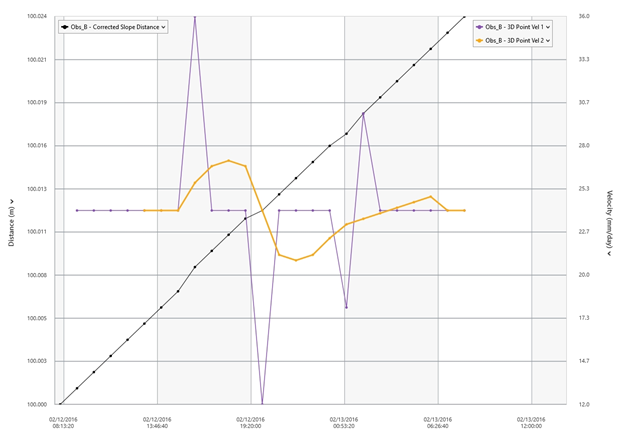
The table and chart below show a simulated set of displacement measurements for a prism over a twenty four hour period.
The prism is moving at a fairly constant rate of 24 mm/day, but when individual pairs of values are compared, the rate fluctuates considerably. In this example, a 6 point velocity calculation has been performed, that is, the velocity has been computed by fitting a trend to the previous six pairs of measurements.
Table 1 Example Velocity Calculation
Time | Slope Distance (m) | Displacement (mm) | 2 Point Velocity (mm/day) | 6 Point Velocity (mm/day) |
00:00:00 | 100.00000 | 0.000 |
|
|
01:00:00 | 100.00100 | 1.000 | 24 |
|
02:00:00 | 100.00200 | 2.000 | 24 |
|
03:00:00 | 100.00300 | 3.000 | 24 |
|
04:00:00 | 100.00400 | 4.000 | 24 |
|
05:00:00 | 100.00500 | 5.000 | 24 | 24.00000 |
06:00:00 | 100.00600 | 6.000 | 24 | 24.00000 |
07:00:00 | 100.00700 | 7.000 | 24 | 24.00000 |
08:00:00 | 100.00850 | 8.500 | 36 | 25.71429 |
09:00:00 | 100.00950 | 9.500 | 24 | 26.74286 |
10:00:00 | 100.01050 | 10.500 | 24 | 27.08571 |
11:00:00 | 100.01150 | 11.500 | 24 | 26.74286 |
12:00:00 | 100.01200 | 12.000 | 12 | 24.00000 |
13:00:00 | 100.01300 | 13.000 | 24 | 21.25714 |
14:00:00 | 100.01400 | 14.000 | 24 | 20.91429 |
15:00:00 | 100.01500 | 15.000 | 24 | 21.25714 |
16:00:00 | 100.01600 | 16.000 | 24 | 22.28571 |
17:00:00 | 100.01675 | 16.750 | 18 | 23.14286 |
18:00:00 | 100.01800 | 18.000 | 30 | 23.48571 |
19:00:00 | 100.01900 | 19.000 | 24 | 23.82857 |
20:00:00 | 100.02000 | 20.000 | 24 | 24.17143 |
21:00:00 | 100.02100 | 21.000 | 24 | 24.51429 |
22:00:00 | 100.02200 | 22.000 | 24 | 24.85714 |
23:00:00 | 100.02300 | 23.000 | 24 | 24.00000 |
00:00:00 | 100.02400 | 24.000 | 24 | 24.00000 |
Figure 2 - GEOExplorerIQ report showing the data in Table 1
Inverse Velocity
Graphs showing inverse velocity are commonly used as tools in the analysis of slope stability and the prediction of time to slope failure. GEOExplorerIQ calculates inverse velocity values for all sensors which measure displacement so that these data sets can be compared on reports.
Displacement and Velocity Data Types in GEOExplorerIQ
GEOExplorerIQ presents lists of data types for each sensor in the monitoring system. Many of these data types are common for most sensors (e.g. measurement age) but some are specific to certain types of sensors. The following paragraphs offer a brief explanation of the most common data types GEOExplorerIQ uses for displacement and velocity.
SD Displacement
This is the change in the measured distance to a prism. Positive values indicate that the prism is moving away from the total station.
3D Displacement
This expresses the relative movement of a point in three dimensions. It is available for sensors that can record an accurate location, e.g. GNSS or prisms that are included in a calibrated total station installation.
Delta Easting, Delta Northing, Delta Elevation
If a 3D displacement is available, then these data types show the x, y, and z components of the 3D displacement vector. They are expressed in terms of the local coordinate system.
Hz Displacement and Vt Displacement
These data types show the horizontal (Hz) and vertical (Vt) components of the 3D displacement.
Average 3D Displacement
The average 3D displacement is calculated as the arithmetic mean of the preceding 24 3D displacement values.
Avg Hz Displacement and Avg Vt Displacement
The average horizontal (Avg Hz) and vertical (Avg Vt) displacements are calculated as the arithmetic mean of the preceding 24 horizontal or vertical displacement values.
3D Point Vel 1 and 3D Point Vel 2
These are velocity values for the 3D displacement that are calculated using the linear trend method described above. The user is able to select how many pairs of previous values are used when fitting a trend to the data. Up to two different values can be set for this parameter, so two 3D Point velocity data types are available (3D Point Vel 1 and 3D Point Vel 2).
3D Period Vel 1 and 3D Period Vel 2
These velocity values are calculated using the same method as the 3D Point Velocities except that the number of pairs of values used for the calculation is determined according to a set time period. For example, if the time period is set to 6 hours and measurements have been taken at 30 minute intervals, then a best fit line will be calculated for 11 measurements.
The user can also set the minimum number of points to use for this calculation. This ensures that spurious values are not generated due to incomplete data sets caused by missing measurements.
As with the 3D Point Velocity, two separate calculations can be defined, so two data types are available.
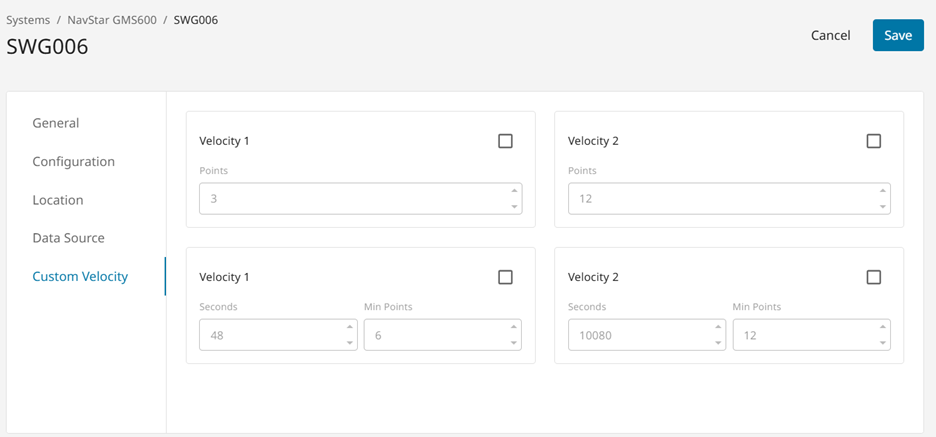
Figure 3 - GEOExplorerIQ settings dialog for custom velocity calculations
3D Point 1/Vel 1, 3D Point 1/Vel 2, 3D Period 1/Vel 1, 3D Period 1/Vel 2
These data types provide the inverse velocity values for the data types described above, i.e. 3D Point Vel 1, 3D Point Vel 2, 3D
Period Vel 1 and 3D Period Vel 2.
Notes on 3D Velocity
GEOExplorerIQ calculates 3D displacement using the position of a point measurement (e.g. prism) relative to a fixed reference location, i.e. the length of a straight line. 3D velocity is the speed at which the measured point is moving, and is not calculated relative to a fixed reference. To determine 3D velocity, GEOExplorerIQ calculates trends for the X, Y, and Z coordinates of the set of measurements and then combines them to produce a velocity.
Rolling Delta Water Elevation
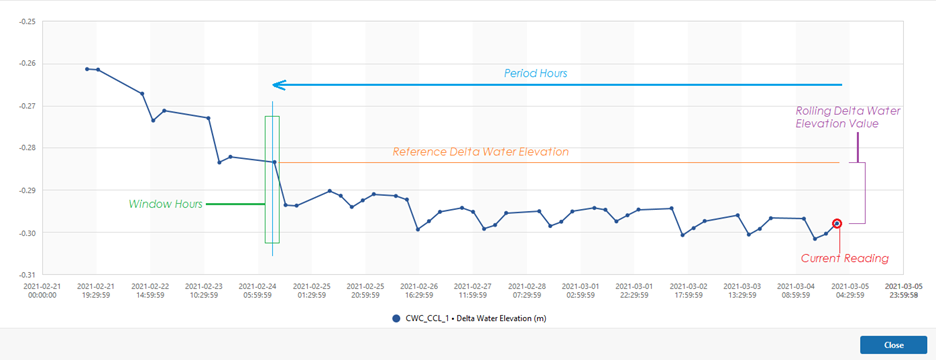
Rolling Delta Water Elevation is a comparison of the current Delta Water Elevation to a previous Delta Water Elevation, at a defined predated period.
There are two variables for Rolling Delta Water Elevation:
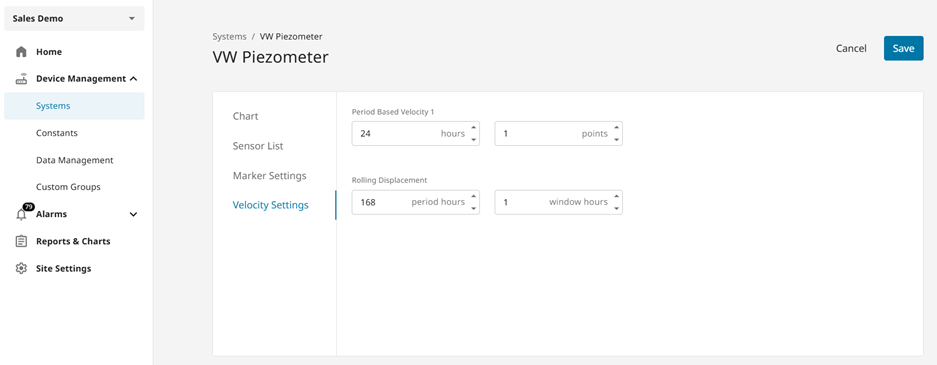
Period Hours - the timeframe which predates the current reading.
Window Hours - the envelope of time that GEOExplorerIQ will search for reference observations.
A visual reference of the Rolling Delta Water Elevation process is provided below.
The Period & Window Hour values for the Rolling Delta Water Elevation calculation can be changed from within the main VW Piezometer or Piezometer sensor group settings menu as shown below.
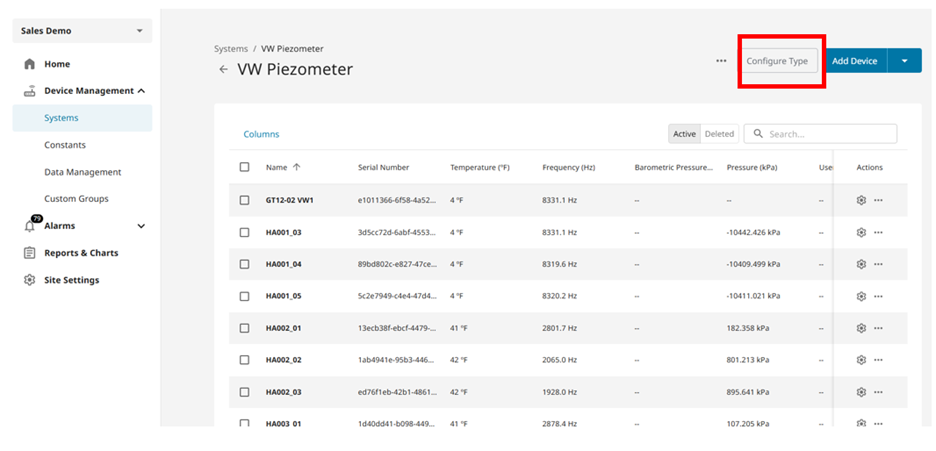
Note that the window hour should be large enough that it will encompass at least one measurement (i.e. if you are on a 6h interval you need at least a 6h window in order to always have a value available for the calculation)
WL Period 1
This value is calculated in the same way as described at the top of this page, and the settings are controlled through the values set in the same VW Piezometer or Piezometer sensor group settings menu as shown above for controlling the Rolling Displacement Calculation.
Summary
- GEOExplorerIQ calculates one, two and three dimensional displacement values for a variety of different monitoring sensors.
- Regression analysis using the least squares method is used to calculate displacement velocities. The user is able to customise these velocity calculations.
- Inverse velocity data types are provided to assist with slope failure prediction.
- Within GEOExplorerIQ, the user handles all displacement and velocity values in the same way, regardless of the type of hardware used to capture the data.